
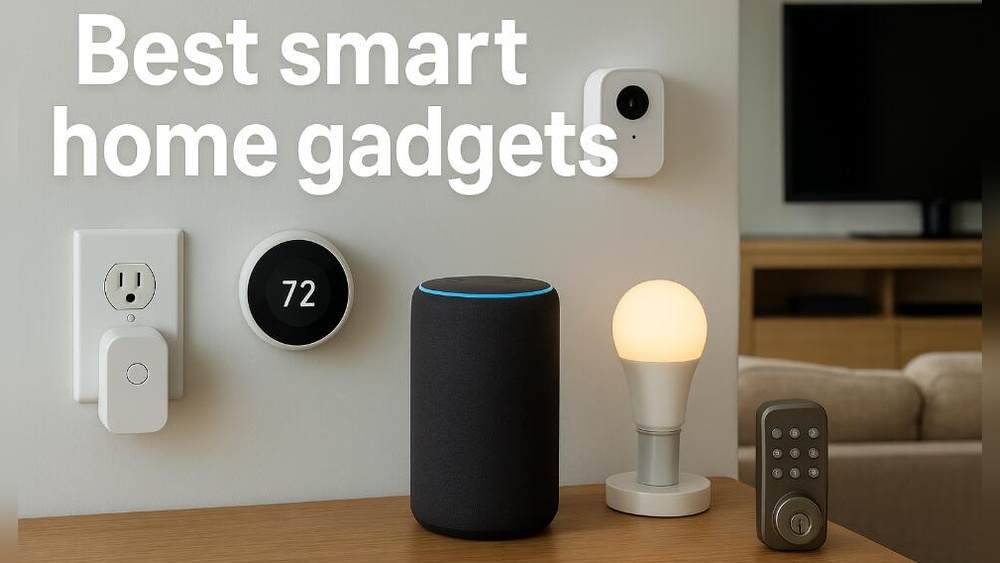
Smart homes are becoming more popular every day. Many people want to make their homes easier to use. But what devices do you need for a smart home? This article will explain the main devices. It will help you understand what to buy and how to use them.
What Is a Smart Home?
A smart home uses devices connected to the internet. These devices can talk to each other and to you. They help with many tasks around the house. For example, turning on lights, locking doors, or setting the temperature.
Smart homes save time and energy. They can also make your home safer and more comfortable.
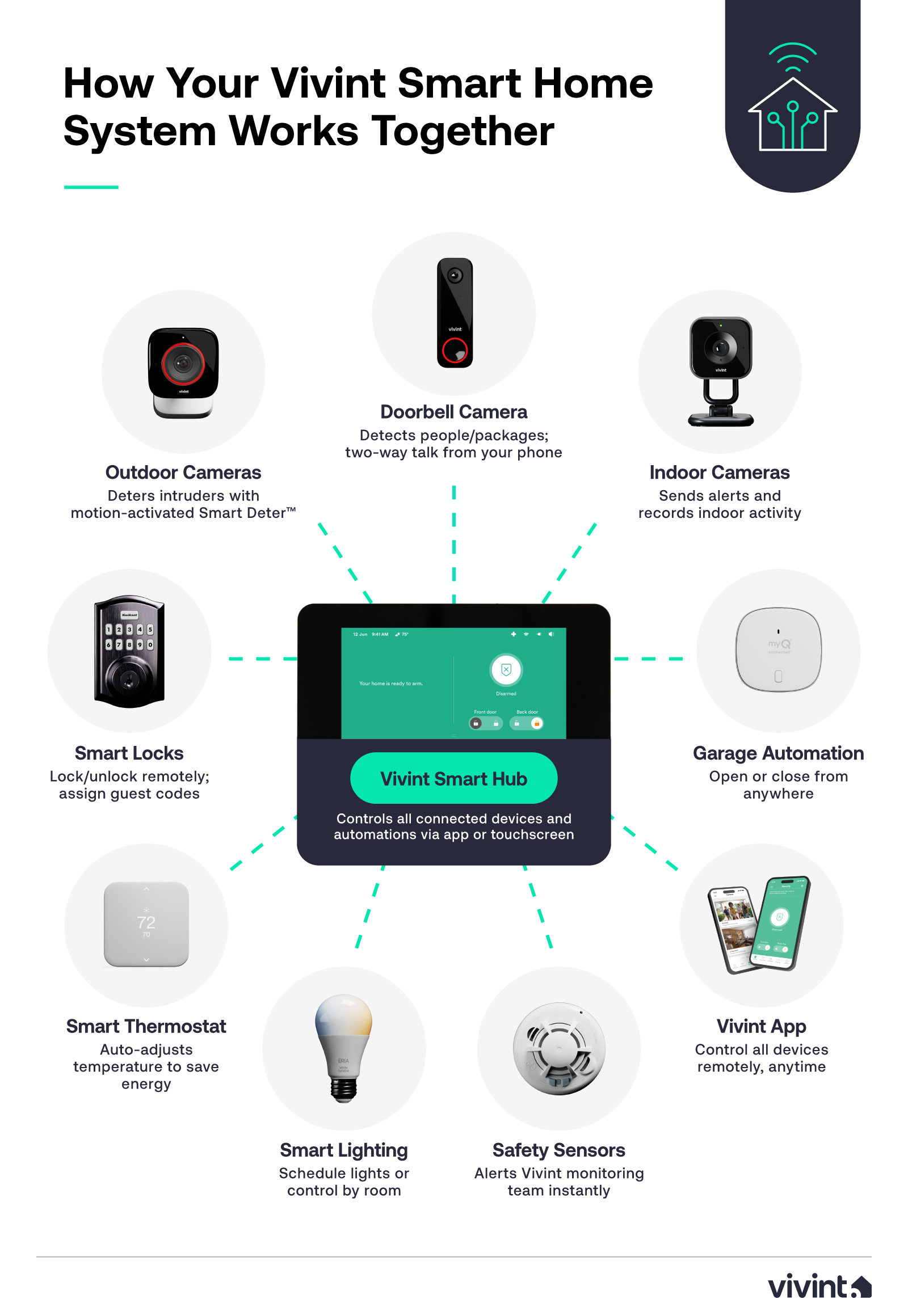
Credit: www.vivint.com
Smart Home Devices You Need
There are many smart devices available. But some are more important than others. Here is a list of devices you should consider for your smart home.
1. Smart Speaker Or Voice Assistant
A smart speaker is a device that listens to your voice. You can ask it questions or tell it to do things. Examples are Amazon Echo, Google Nest, or Apple HomePod.
With a smart speaker, you can:
- Play music
- Get news or weather updates
- Control other smart devices
- Set alarms or reminders
This device acts like the brain of your smart home. It connects and controls many other devices.
2. Smart Lights
Smart lights can be turned on or off with your phone or voice. You can also change their color and brightness.
Benefits of smart lights:
- Save energy by using only the light you need
- Make your home look nice with different colors
- Control lights from anywhere using your phone
Popular smart lights are Philips Hue and LIFX. They are easy to install and use.
3. Smart Thermostat
A smart thermostat controls your home’s heating and cooling. You can set the temperature from your phone. It learns your habits to save energy.
Why get a smart thermostat?
- Save money on energy bills
- Keep your home comfortable
- Control temperature even when you are away
Examples include Nest Thermostat and Ecobee.
4. Smart Security Cameras
Security cameras help you watch your home. You can see live video on your phone. Some cameras send alerts if they see movement.
Smart cameras increase your home’s safety. You can watch your kids, pets, or check for strangers.
Popular brands are Ring, Arlo, and Wyze.
5. Smart Door Locks
Smart door locks let you lock or unlock doors with your phone or voice. You do not need keys anymore.
These locks can:
- Give access to family or friends
- Send alerts when someone enters
- Increase home security
August and Schlage are well-known smart lock brands.
6. Smart Plugs
Smart plugs turn regular devices into smart devices. You plug them into the wall, then plug your device into the smart plug.
With smart plugs, you can:
- Turn on and off lamps or fans remotely
- Set schedules for devices
- Save energy by controlling power use
TP-Link and Wemo make popular smart plugs.
7. Smart Sensors
Smart sensors detect things like movement, light, or temperature. They can send alerts to your phone or trigger other devices.
For example, motion sensors can turn on lights when you enter a room. Door sensors can alert you if a door opens.
Smart sensors make your home more responsive and safe.
How to Connect Your Smart Devices
Most smart devices connect through Wi-Fi. Some use Bluetooth or other methods. To control them easily, use a smart home app or voice assistant.
Here are steps to connect devices:
- Buy devices that work with the same system (like Google, Amazon, or Apple).
- Download the app for each device.
- Follow the app instructions to connect the device to your Wi-Fi.
- Link devices to your voice assistant if you have one.
- Test the device to make sure it works.
Tips for Choosing Smart Devices
Before buying smart devices, consider these tips:
| Tip | Why It Matters |
|---|---|
| Check device compatibility | Devices should work well with each other. |
| Choose easy-to-use devices | Simple devices save time and frustration. |
| Look for good reviews | Other users’ experiences help you decide. |
| Consider your budget | Smart home devices come at different prices. |
| Think about your needs | Buy devices that fit your daily life. |
How to Start Your Smart Home
Starting a smart home can feel hard. But it can be easy if you start small.
Here is a simple plan:
- Buy a smart speaker first to control other devices.
- Add smart lights to control your home lighting.
- Get a smart thermostat for comfort and savings.
- Add security devices like cameras and locks later.
Take your time. Add devices one by one. This helps you learn and save money.

Credit: currently.att.yahoo.com
Benefits of a Smart Home
Smart homes offer many benefits. Here are some of the main ones:
- Convenience: Control devices with your voice or phone.
- Energy saving: Use only what you need.
- Safety: Watch your home and control locks remotely.
- Comfort: Set perfect temperature and lighting.
- Fun: Play music or control gadgets easily.
Frequently Asked Questions
What Basic Devices Do I Need For A Smart Home?
A smart speaker, smart lights, and a smart thermostat are essential starting devices.
Can I Control Smart Devices With My Phone?
Yes, most smart devices connect to apps for easy phone control.
Do Smart Home Devices Require Wi-fi?
Yes, Wi-Fi is needed for most smart devices to communicate and work.
Which Device Controls All Smart Home Gadgets?
A smart home hub or smart speaker often acts as the central controller.
Conclusion
Building a smart home needs the right devices. Start with a smart speaker, lights, and thermostat. Add security cameras and smart locks for safety. Use smart plugs and sensors to control other devices.
Remember to choose devices that work well together. Use easy apps and follow simple steps to connect them. Take your time and build your smart home step by step.
Smart homes make life easier, safer, and more comfortable. Now you know what devices you need to start. Happy smart home building!